












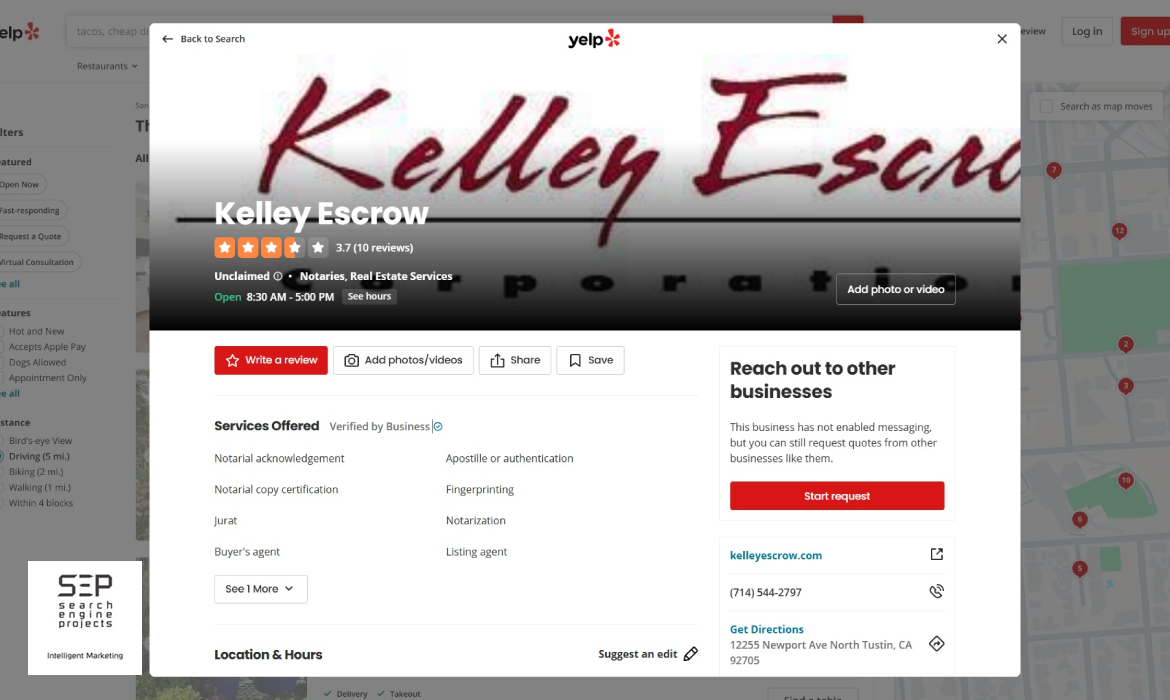
What Businesses and Users Need to Know About the New Yelp Page Pop-up Display
Yelp, a dominant business listing and review-driven force in the USA’s local business directory, has been rolling out a new feature designed to refine how business listings are displayed.
Specifically, a pop-up display appears for some business listings when users click on them.
While Yelp likely introduced this feature to enhance the user experience and increase visitor click-through rate, early observations, especially among desktop users, reveal several issues that are negatively affecting both user engagement and business visibility.
We’ll explore the emerging issues associated with the new Yelp Pop-up Display format, focusing on its impact on user behavior, business exposure, and overall site functionality.
1. Confusion Around User Intent
Traditionally, when a Yelp user clicks on a business listing, they expect to be taken to that business’s dedicated page, with full access to reviews, photos, location, contact information, services, and more. However, with the introduction of this new Pop-up Display format, the process has changed:
- Instead of being taken to a complete listing page, a pop-up window appears over the current page.
- This pop-up contains a condensed version of the business information.
- It shows only:
- Business Name
- Business website
- Business Categories
- Phone Number
- Address
- Write a Review, Add photos, Share, Save
- Photos and Videos
- It is missing:
- Amenities and More
- Ask the Community
- Ask a question
- Recommended Reviews
- Reviews Listing
- Unfortunately, this behavior is often misaligned with the user’s expectations.
For users actively researching or comparing businesses, this adds an unnecessary barrier. The pop-up interrupts the browsing flow, causing friction rather than providing a smoother experience.
2. Critical Content Is Hidden or Inaccessible
One of the most significant issues is the user experience issues with the new Yelp Pop-up is that key business information is not fully visible:
- Missing Portfolio and Visual Content: Businesses with uploaded project portfolios, detailed images, or menus have found that these assets no longer display correctly—or at all—within the pop-up window.
- No Scroll or Dropdown Mechanism: In many desktop views, the pop-up lacks a visible or functional scroll bar or a drag-down toggle, preventing users from accessing the full content.
- Action Buttons Obscured: Call-to-action elements, such as
- Amenities and More
- Ask the Community
- Ask a question
- Recommended Reviews
- Reviews Listing
They are sometimes hidden below the fold, making them inaccessible.
This lack of accessibility hurts the user experience and reduces conversions for businesses that rely on Yelp to generate leads.
3. UI Design and Functionality Problems
User Interface (UI) design is critical to any platform update, and Yelp’s rollout of this new pop-up format seems to have bypassed thorough UI testing—especially for desktop users. Some of the most reported issues include:
- Pop-up Not Closing: Since there is no scroll function, the user has only two options: close the page or go back to search. Yelp is using the pop-up as a landing page with fewer options for Users. This forces users to reload the page or use the back button.
- Frozen Pop-ups: Clicking on another listing sometimes freezes the previous pop-up instead of switching cleanly, resulting in a clunky user experience.
- Overlay Errors: The pop-up can sometimes overlay itself, stacking or duplicating elements that confuse the viewer.
All of these contribute to a cluttered, frustrating user interface that undermines the goal of enhancing usability.
4. Ads and Sponsored Content Intrusion
Another source of confusion is sponsored content within the pop-up. When a user clicks on a business, they expect to see details about that specific business—not ads for competitors. However:
- Some users report that pop-ups load with ad banners or links to competing businesses, particularly when the business clicked on is not currently advertising on Yelp.
- This leads to user distrust and a high bounce rate because it undermines the perceived credibility and authenticity of the information.
For paying advertisers, this also raises concern. If their listing is subject to this type of behavior, their ad dollars may not be driving the expected level of visibility or engagement.
5. SEO and Analytics Disruption
From a digital marketing standpoint, the new pop-up model raises flags:
- No Unique Page Load: Because the pop-up overlays the existing search results page instead of loading a unique business page URL, this may disrupt tracking via Google Analytics, UTM parameters, or Yelp’s metrics.
- Impact on Organic Reach: Businesses that have invested significant effort in optimizing their Yelp pages (including descriptions, reviews, and photos) are experiencing diminished returns on investment due to reduced visibility in the pop-up format.
- Reduced Time on Page: The poor user experience causes many visitors to quickly close the pop-up or exit Yelp altogether, reducing average time on page and potentially lowering Yelp’s trust score in user perception.
6. High Bounce Rate and Lost Leads
The most significant consequence of the pop-up issue is lost business:
- Many users who click on a listing to contact or learn more are bouncing back because they cannot find the information they need.
- Yelp’s failure to allow full-page viewing of a business listing creates a broken lead generation funnel.
- Businesses are experiencing fewer interactions on Yelp, despite no changes in ranking or visibility.
In an environment where every click and conversion matters, this can result in real, measurable declines in phone calls, quote requests, and customer inquiries.
Recommendations for Yelp and Business Users
For Yelp:
- Improve UI Testing: Roll back or revise the pop-up feature until it functions properly across all devices.
- Make Full Pages Easily Accessible: Offer a “View Full Listing“ button clearly within the pop-up.
- Fix Scroll and Close Features: Ensure that all content, including media and CTAs, is accessible without friction.
For Business Owners:
- Submit Feedback to Yelp: Use Yelp’s support or advertiser contact form to report the issue.
- Monitor Yelp Insights: Compare traffic and lead volume before and after the pop-up update to determine its impact.
- Guide Customers Elsewhere: If Yelp’s behavior remains a problem, consider steering potential clients to your website or Google Business Profile instead.
Conclusion
The recent change to Yelp’s business listing display, implemented via pop-up windows, has introduced significant challenges, particularly for desktop users. From missing content and broken UI to ad interference and lead loss, these issues are more than cosmetic; they harm the overall user experience. They affect Yelp’s core function as a business discovery platform.
If Yelp intends for this feature to be a long-term design choice, it must address the flaws with urgency and transparency. Otherwise, users and business owners may start looking elsewhere for more reliable, user-friendly alternatives.
If you’re a business frustrated with Yelp’s new pop-up behavior and want help improving your online visibility across multiple platforms, consider working with an experienced digital marketing agency that is a Yelp Advertising Partner and understands how to adapt and maximize ROI even when platform changes occur.